



Know what to reorder, and when
Reorder guidance from your own sales history, with low-stock alerts and a weekly digest.
 Miko Restock: Inventory & PO
Live on App Store
Miko Restock: Inventory & PO reads your store's own sales history and tells you what to buy, how much, and when. It turns that into purchase orders for your suppliers, counts your stock, and shows you the cash sitting still on your shelves.
 Miko Restock: Inventory & PO
Why merchants install it
Reorder guidance from your own sales history, with low-stock alerts and a weekly digest.

Raise purchase orders from what you need; on Pro, email them straight to suppliers.

Reports show the stock that is not selling, so you can clear it before you buy more.
How it works
Add Restock from the Shopify App Store and import history from another tool if you have it.
Restock reads your sales history and shows what to buy and when.
Raise purchase orders and run quick stock counts with CSV export.
Every number below comes from sales you already made. Nothing is written to your store until you say so.
01Buy Sheet
Miko imports up to a year of order history and works out how fast each product really sells, so the numbers come from your shop rather than a rule of thumb.

02Suppliers
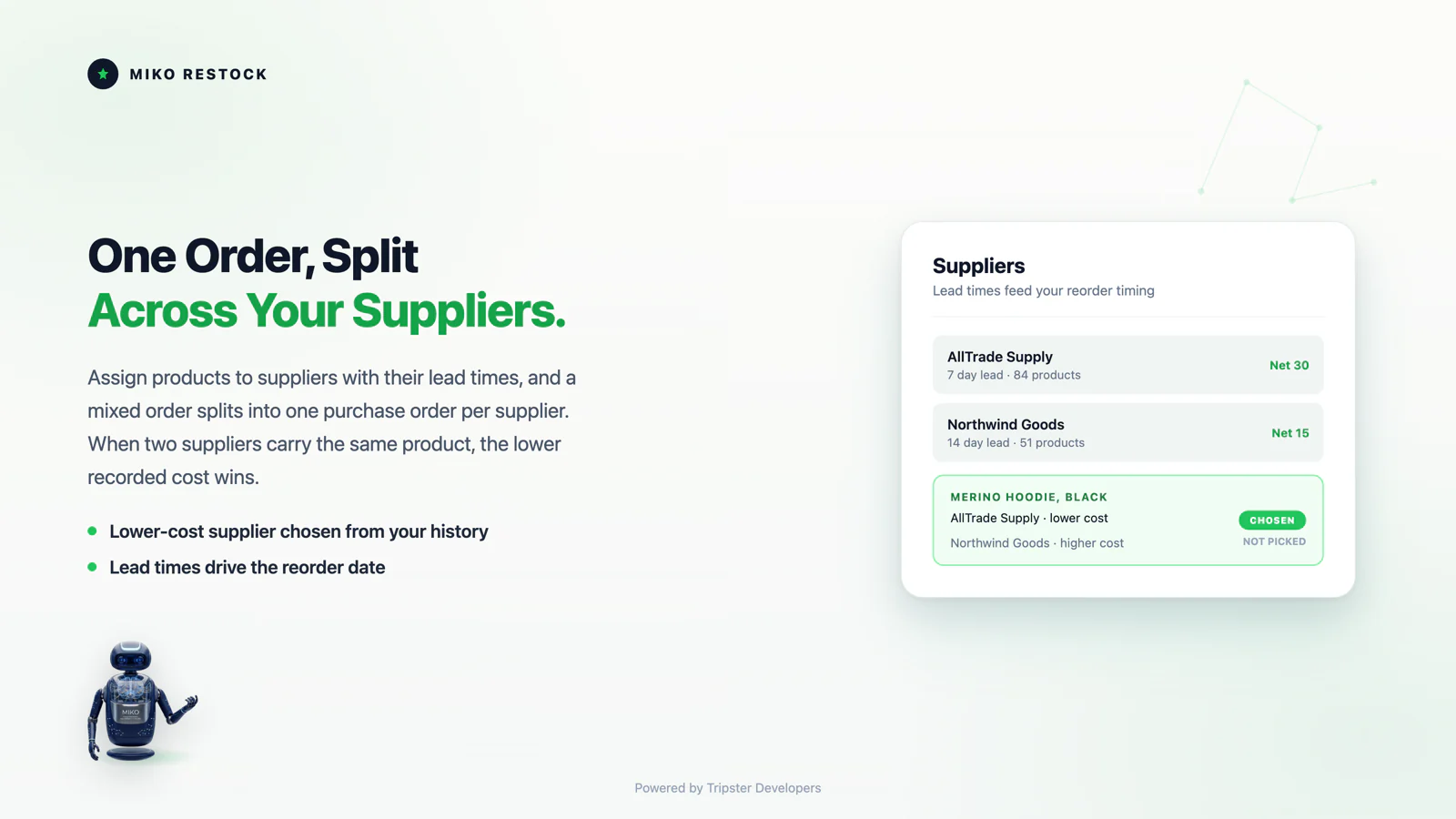
A supplier who takes three weeks needs an earlier order than one who ships next day. Lead times are built into every recommended quantity and date.
03Purchase orders
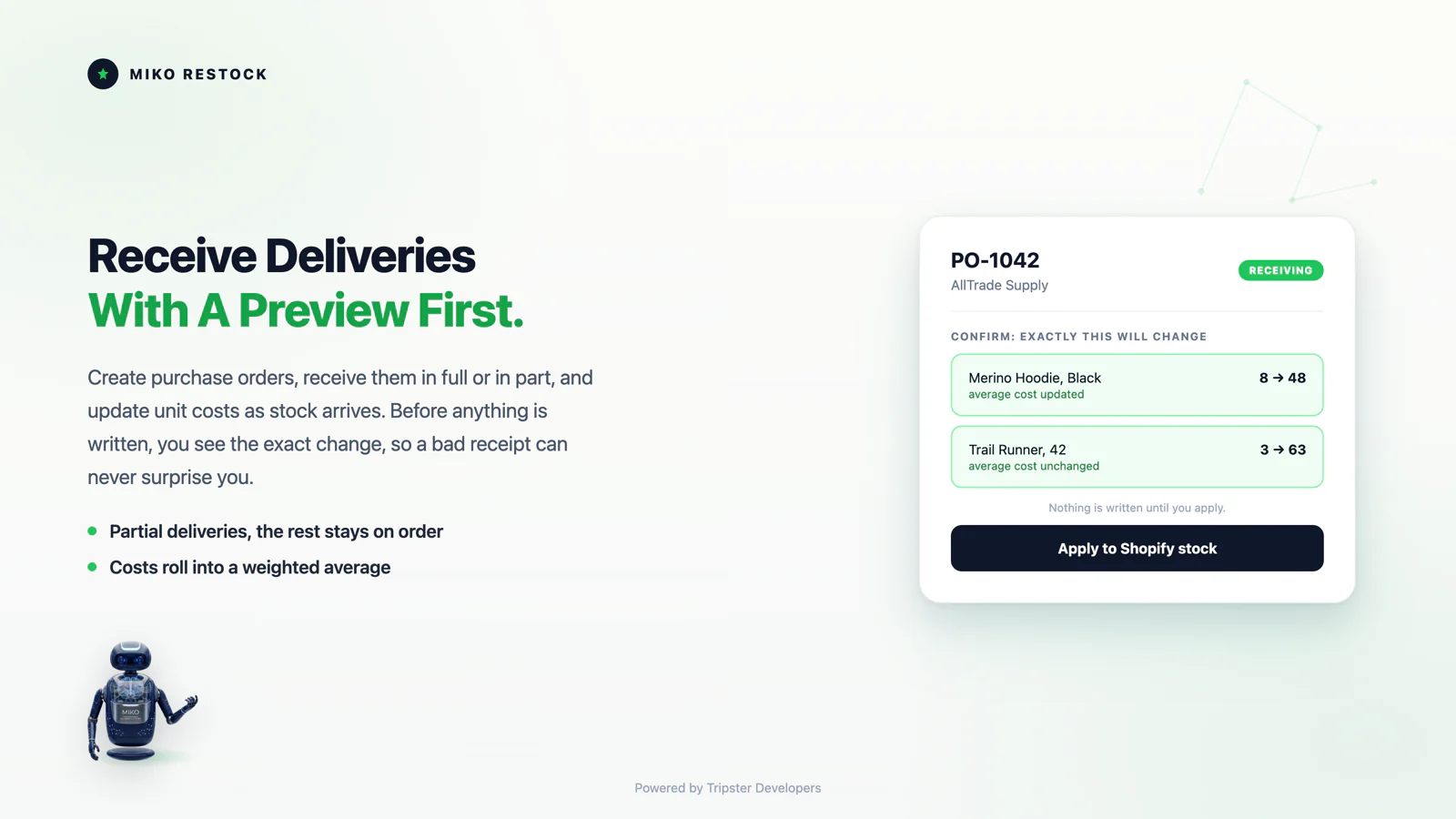
Create a purchase order from the Buy Sheet, send it, then receive it in full or in part. Miko previews every stock and cost change before it writes anything.
04Stocktakes
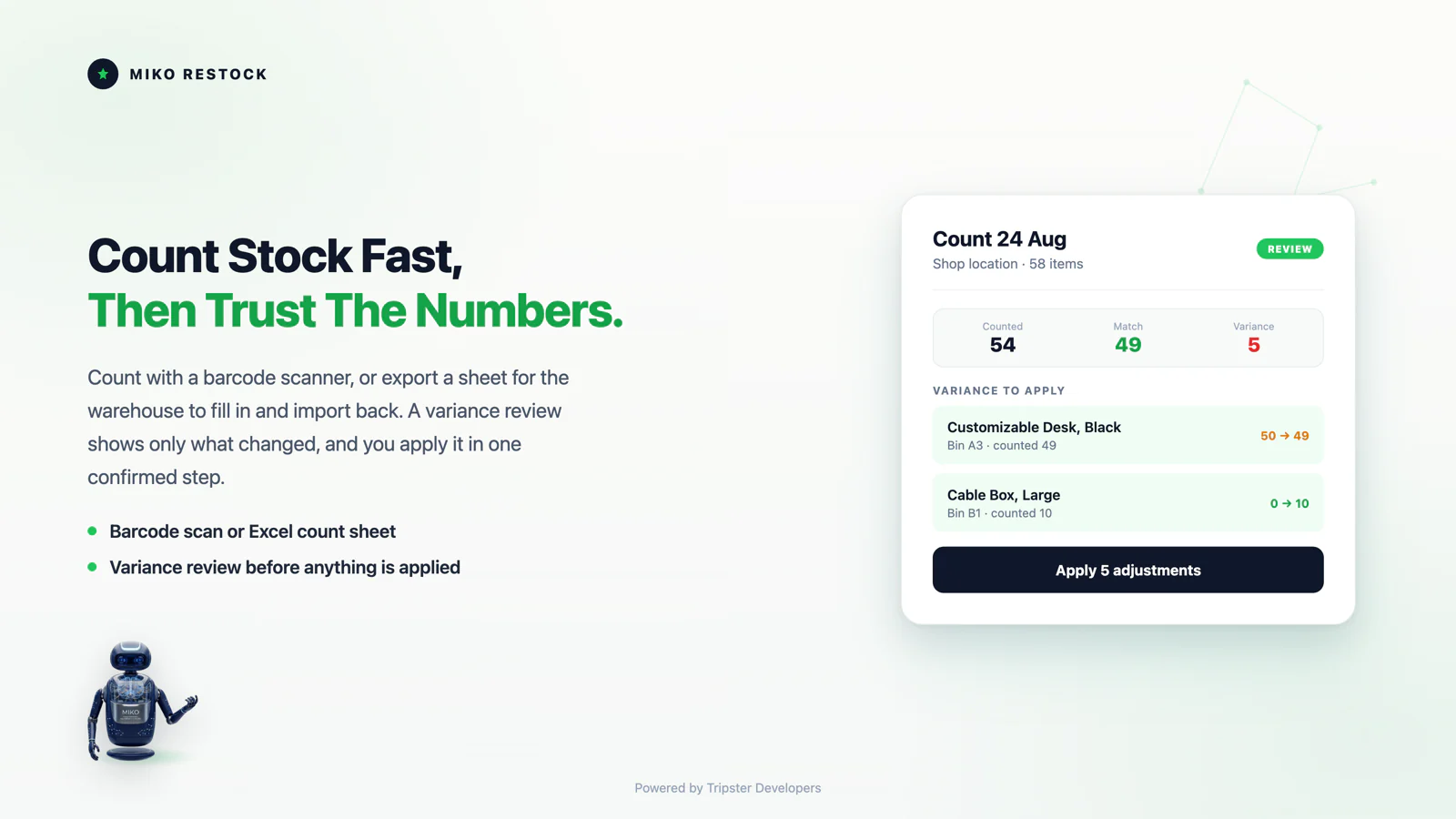
Scan with a barcode reader, type counts on screen, or export a sheet for the warehouse and import it back. Bin locations on Pro. You approve the variance before stock moves.
05Dead stock
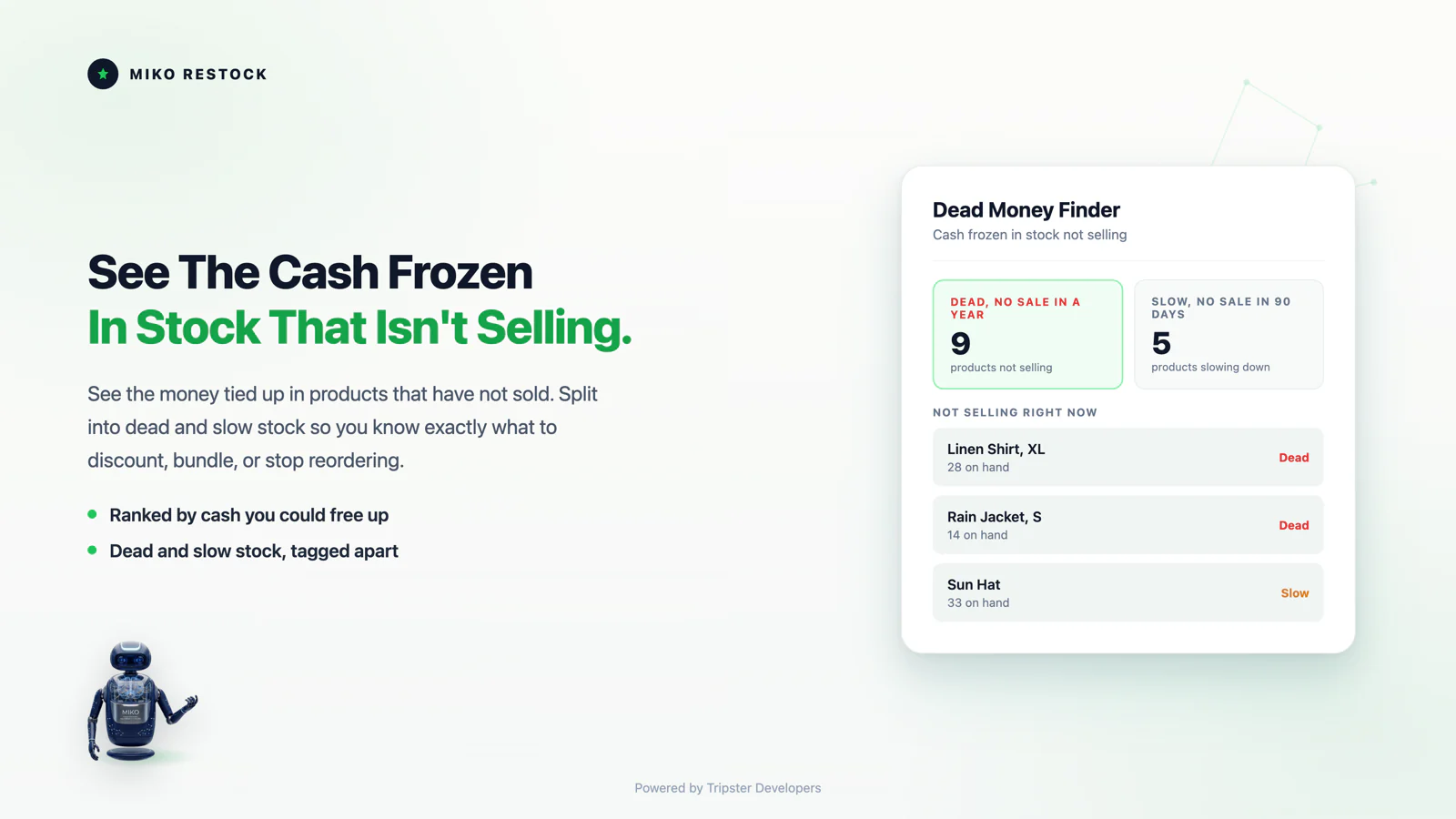
The cash frozen in stock that is not selling, sorted so the biggest offenders are first. Dead is a year with no sale, Slow is ninety days. Discount it, bundle it, or stop reordering it.
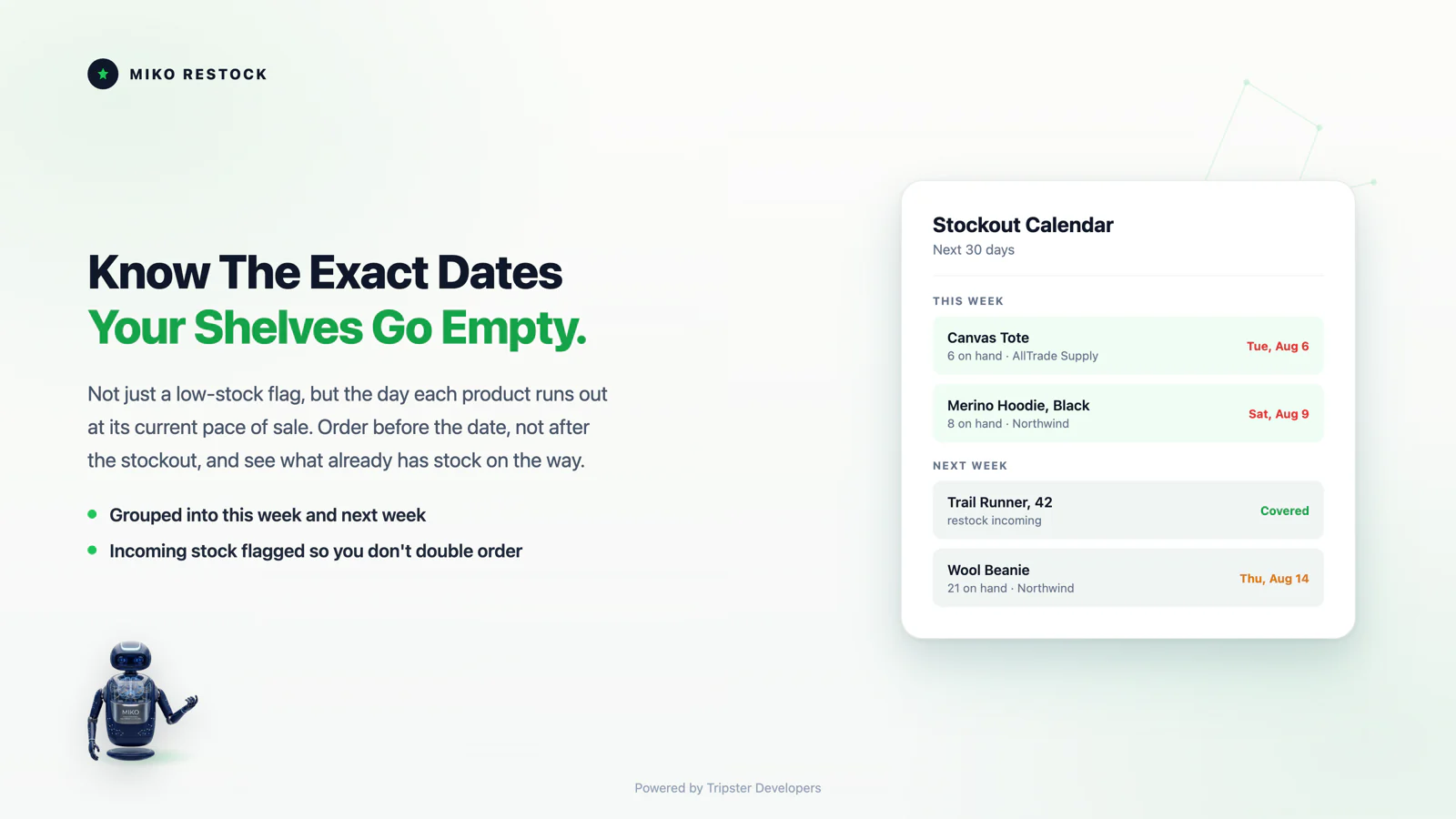
06Run-out dates
The date each product is due to run out at its current pace, grouped so you can see what needs an order this week and what can wait. It is a planning view and changes nothing.
See it in action
One minute, showing the part that matters: the forecast, the reorder point and the purchase order it produces.
How it works
There is nothing to configure before you get value. Miko syncs your catalog and your order history, then the Buy Sheet is ready. Three settings tune it: how many days of cover to aim for, when to warn you, and your default supplier lead time.
Miko imports your products and up to 365 days of order history. On a large catalog this takes a few minutes, and the Buy Sheet fills in as it finishes.
Every product with its sales pace, days of cover left, and a recommended order quantity that already accounts for stock on the way.
Tick the lines you want. Miko splits them into one draft purchase order per supplier, with quantities filled in and the lower recorded cost chosen for you. Receive deliveries in full or in part with a preview of every change, and run stocktakes when you want the shelves and Shopify to agree.
Features
Knowing what to buy is the start. Miko Restock: Inventory & PO also shows you the money already tied up, the dates you are heading for trouble, and the supplier prices that have quietly crept up.
Supplier prices rarely jump. They creep. Cost Guard compares the first and latest cost you recorded per product and puts the biggest rises in front of you, ready for a conversation.
On the day and time you choose, Miko drafts the week's purchase orders and emails you a summary. Drafts only. A person always approves before a supplier hears anything.
Coming off Stocky or another tool? Upload your CSV exports and Miko rebuilds your purchase order history and your suppliers, so you do not start from an empty app. Stocky has closed. See exactly what you lose and how to get it out.
An email when products are out or about to run out, and a weekly stock-health digest, each with the full list attached as a spreadsheet so nothing is cut off.
Ask Shopify's own assistant what is low or what you should reorder, and it answers from your live Miko Restock: Inventory & PO data. Read-only, and on every plan.
It runs inside your Shopify admin on Shopify's own inventory, with no theme changes. It uses order dates and quantities only, never customer names or addresses.
Technical Edge
Miko Restock reads and writes the stock Shopify already holds, through Shopify's own APIs, and keeps the forecast maths simple enough to check by hand.
Checked in the Miko Restock code, September 2026
Pricing
Everything that helps you see your inventory is free. Pro lifts the volume caps and adds the tools that act for you.
$0/mo
20 purchase orders a month
$15/mo
7-day free trial
Built For
Miko Restock: Inventory & PO puts both in front of you, in plain numbers, from data you already have.
FAQ
Forecasting, purchase orders, stocktakes and billing, answered plainly.
Yes. Miko Restock: Inventory and PO is live on the Shopify App Store at apps.shopify.com/miko-restock-inventory-po with a free plan available. The merchant guide walks through the Buy Sheet, purchase orders and stocktakes end to end.
No. Stock is written to Shopify only when you receive a purchase order or apply a stocktake, and both show you the exact change before anything happens. The Buy Sheet, Dead Money Finder and Stockout Calendar are reports. They never change stock.
Yes. Rescue Import rebuilds your purchase order history and your supplier records from CSV exports, so you do not start from an empty app. Imported purchase orders are numbered distinctly so they never clash with new ones.
The Buy Sheet, Dead Money Finder, Stockout Calendar, low-stock alerts and the weekly digest, quick stock counts, and 20 purchase orders a month. Pro is $15 a month with a 7-day free trial and lifts the caps.
Yes. Miko reads inventory across all of your active locations on every plan, so the Buy Sheet reflects your true total stock. Purchase orders and stocktakes let you choose the location to receive into or count.
Miko Restock: Inventory & PO uses order dates and line-item quantities only. It never stores customer names, emails or addresses. Data is encrypted in transit and at rest, and everything held for your shop is deleted after you uninstall, when Shopify sends its shop data removal request 48 hours later.
One line per product with its real sales pace, the days of cover left at that pace, and a recommended order quantity and date. It is built from up to a year of your own order history, so the numbers come from your shop rather than a rule of thumb.
A supplier who takes three weeks needs an earlier order than one who ships next day, so lead times are built into every recommended quantity and date. Set them once per supplier and the Buy Sheet works around them.
Yes. Create a purchase order from the Buy Sheet, send it, then receive it in full or in part. Every stock and cost change is previewed before anything is written. On Pro, purchase orders go out branded and emailed to the supplier directly.
A report showing the cash tied up in stock that is not selling, so you can see exactly which lines are holding money you could spend on the products that do sell. It is a report only and never changes stock.
The date each product runs out at its current sales pace, laid out ahead of time. It turns 'we should order soon' into a specific date per product, before the shelf is empty.
Three ways, depending on how you count: scan with a barcode reader, type counts on screen, or export a sheet for the warehouse and import it back. You approve the variance before stock moves. Quick counts up to 100 items are free; full stocktakes with bin locations are on Pro.
Yes. You get an email when products are out or about to run out, plus a weekly stock-health digest, each with the full list attached as a spreadsheet so nothing is cut off in the email body.
Yes. Ask Sidekick what is low and what to reorder, and it answers from the same numbers the Buy Sheet shows. There is nothing extra to set up.
There is nothing to configure before it is useful. Install, let it import up to a year of order history, and the Buy Sheet, Dead Money Finder and Stockout Calendar populate from your own data.
Through Shopify's native billing, so charges appear on your Shopify invoice alongside your other apps. Cancel any time by uninstalling or from within the app; there are no cancellation fees or minimum contract periods.
Miko Apps
The merchant guide walks through every screen, every setting and every report.
The Miko Suite
Every Miko app is built to compound with the others: one customer brain, one checkout, one support team.
 Miko Loyalty & RewardsPoints, VIP tiers and referrals that bring shoppers back.→
 Miko B2B Wholesale PricingWholesale prices by customer tag, NET terms and POs.→
 Miko Claude AIChurn prediction, RFM segments and AI win-backs.→
 AI Descriptions & NarrateBulk SEO copy in your voice, plus a Listen button.→
 Miko Product RentalsDate pickers, deposits and overbooking protection.→
 Miko Subscribe & SaveSubscriptions and subscribe & save with a self-serve portal.→
 Miko Bulk Image ResizerResize, compress and watermark every product photo.→
 Authentica: COA CertificatesQR-verified Certificate of Authenticity for every order.→
 Miko AI Help Center & FAQHelp centre and FAQ pages written from your own store data.→
 Live Odoo ConnectorReal-time two-way Shopify to Odoo ERP sync. Custom install.→
Not on Shopify yet?
Set up your store in minutes and try it with your own products. Loyalty, wholesale pricing, AI descriptions and the rest of the Miko apps install in one click once your store is live.